

Self-hosted CRM & project management for agencies
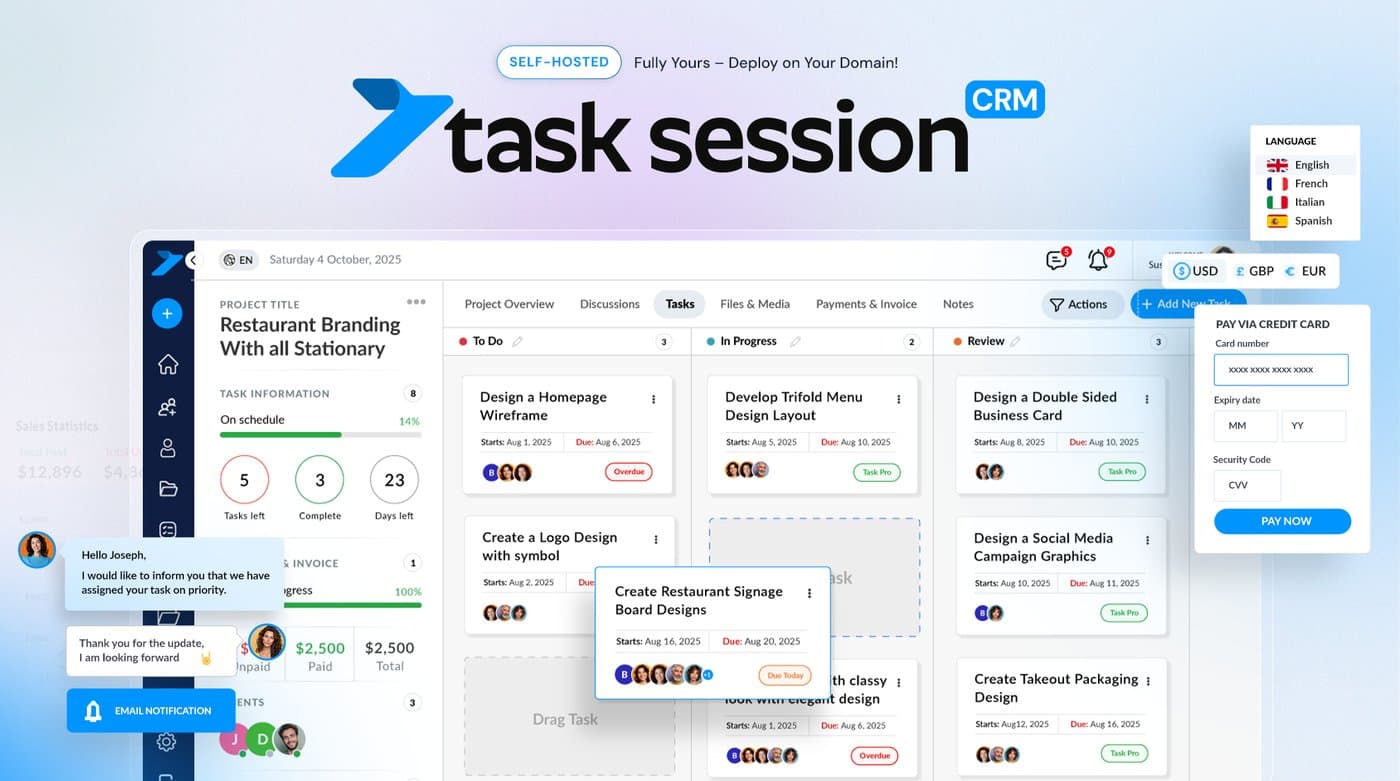
Task Session is a self-hosted CRM and project management suite for agencies, freelancers and small teams. Install it on your own domain and run clients, projects, tasks, invoices and team chat from one place.
It comes with one flat licence and unlimited users, so you do not pay more as your team grows. Your data stays on your own server, with no SaaS lock-in. You can also white-label it with your own logo and colors.
Try the live demo at demo.tasksession.com. A free open-source edition (AGPL-3.0) is on GitHub: github.com/tasksession/tasksession-crm
6 ratings

AI video with native sound, paid per clip. Nothing stored.

A calmer Mac menu bar, one click away.

Enterprise Software. Intelligent Automation. Global Impact.


Comments
24Hi Fazier! We built Task Session because agencies we worked with were paying for a CRM, a project tool, an invoicing app and a chat app, and still copying data between them. Most of them also paid per user, so every new hire made the bill bigger. Task Session puts clients, projects, tasks, invoices and team chat in one app that you host on your own domain. It has one flat licence and unlimited users. There is also a free open-source edition on GitHub if you want to try it on your own server. You can try the live demo at demo.tasksession.com. We would love your feedback, especially on what your team still needs from a self-hosted CRM.
Solo founder of Dualog: everything that matters about your people in one place, not just in your head
I like that there's a live demo and an AGPL edition on GitHub, so people can see how it works before paying. How do updates work for the self-hosted version: a one-click update from the admin panel, or do people pull new releases by hand?
Thanks Lena! Updates are one click from the admin panel, so there is no need to pull new releases by hand.
Writer
I really like the fact that there’s a live demo available along with an AGPL edition on GitHub. It gives people a chance to explore the product, understand how it works, and even test it themselves before deciding whether to pay for the hosted or premium version. I think that kind of transparency is especially useful for developers and technical users. One thing I was wondering about is how updates are handled for the self-hosted version. Is there a simple one-click update option directly from the admin panel, or do users need to manually pull and install each new release from GitHub? It would be interesting to know how easy it is to keep a self-hosted installation up to date over time.
Thanks Abdo! Keeping it up to date is simple: updates install with one click from the admin panel, so you don't need to download and install each release from GitHub yourself.
Mechanical Engineer
It s very good to provide live demo,
Thanks Caner! The demo at demo.tasksession.com is open to everyone, so feel free to click around.
AI Creativity
very cool and usefull
Thanks Iftikhar, glad you find it useful!
Hi, I am Chris! Join me on my journey to build the best Atlanta Chat Line in the city!
The stripe integration is interesting; its not commonly found with other PM tools. Also this is based on Google ecosystem which is familiar to a lot of freelancers.
Thanks Chris! Stripe handles invoices, payments and subscriptions, and Google Login and Google Drive make it easy to fit into an existing Google setup.
Indie iOS developer. Making Sundial, time drawn as marks of ink. softminilabs.github.io/en/
A flat licence with unlimited users is a strong pitch for agencies whose headcount grows faster than their revenue. How do updates work on self-hosted installs: one click from the admin panel, or a manual pull and migration? That is usually where self-hosted tools lose me, so a clear upgrade path would be a big selling point.
Agreed, that is where most self-hosted tools lose people. Task Session updates with one click from the admin panel, so there is no manual pull. Thanks for the feedback!
Building PZERO, saving you money - pzero.studio
A self-hosted CRM and project workspace that keeps clients, tasks, invoices, chat, and white-labeling under one unlimited-user licence lets agencies drop the usual per-seat SaaS stack. When you need a steadier line on model spend, PZERO is at pzero.studio.
It s very good to provide live web
Thank you! Happy to answer any questions after you try the demo.
Building features to make hiring great again
The client portal looks like the most useful part for agencies, since clients seeing their own tasks saves a lot of status emails. Can you control visibility per task or file inside a shared project, so internal tasks and drafts stay hidden from the client? And what does the paid licence add over the AGPL edition on GitHub?
Thanks Claudio! Files and folders can be hidden from the client, per project and per user, so drafts can stay internal. Tasks inside a shared project are visible to all project members, so for internal-only work we use internal tasks that are not linked to the client project. The paid licence adds the full leads CRM and pipeline, invoicing, team chat, files and media, email and calendar sync, web forms, advanced roles, the white-label client portal, plus updates and support. Full comparison is on tasksession.com/pricing
The time tracking sitting next to invoices and the client portal is what stands out to me. Can tracked hours on a task be turned into an invoice line (and shown to the client in the portal), or do you create invoices separately? For agencies that bill by the hour, that link is usually where the most manual copy-pasting disappears.
Good question. Today they are two separate steps. The client can see the hours tracked on their tasks in the portal, but those hours do not turn into invoice lines automatically. You create the invoice separately and add the hours as line items. Thanks for flagging it, linking tracked time straight to invoices is a fair request for hourly-billing agencies.
The flat licence with unlimited users is exactly the right pricing shape for agencies — per-seat SaaS gets painful when you add contractors per project. Two practical questions: for the white-label client portal, can each client get their own subdomain or custom domain, and does the AGPL edition include the invoicing/Stripe modules or are those commercial-only? Also curious how upgrades work for self-hosted instances — is there a one-click updater or is it a manual pull?
Thanks! Yes, each client portal can run on its own subdomain or custom domain. Invoicing and the Stripe integration are in the paid plans; the free AGPL edition covers projects, tasks, Kanban and time tracking for unlimited users. Updates are one click from the admin panel, so there is no manual pull.
The flat licence with unlimited users is the right call for agencies — per-seat pricing quietly taxes team growth. One question on the client portal piece: can clients review and approve deliverables without creating an account, or do they log in? In practice the friction is always on the client side; a guest/magic-link view for approvals usually cuts the support back-and-forth a lot. Also good move shipping an AGPL edition — self-host buyers usually want to read the code before committing, so that builds trust.
Thanks! Clients log in to their own portal to see their projects and tasks, so there is no guest or magic-link view right now. That is useful feedback on approvals, and we have noted it.