

⚡️ A cyberpunk inspired management app for SQLite
4.8(6)22TechnologyManagementDatabase
SQLite Hub is a local-first SQLite manager and CLI designed for people who work directly with SQLite files as products, research sources, operational datasets, prototypes, or evidence. The project aims to make SQLite databases easier to inspect, edit, understand, document, visualize, and export without forcing users into a cloud platform or a heavyweight enterprise database client.
The core idea behind SQLite Hub is simple: many useful applications, internal tools, research projects, AI workflows, media archives, scraping pipelines, and prototypes already store important data in local SQLite files. However, working with those files often requires jumping between terminal commands, database browsers, spreadsheet tools, Markdown notes, charting tools, and custom scripts. SQLite Hub brings those everyday workflows into one focused local workspace.
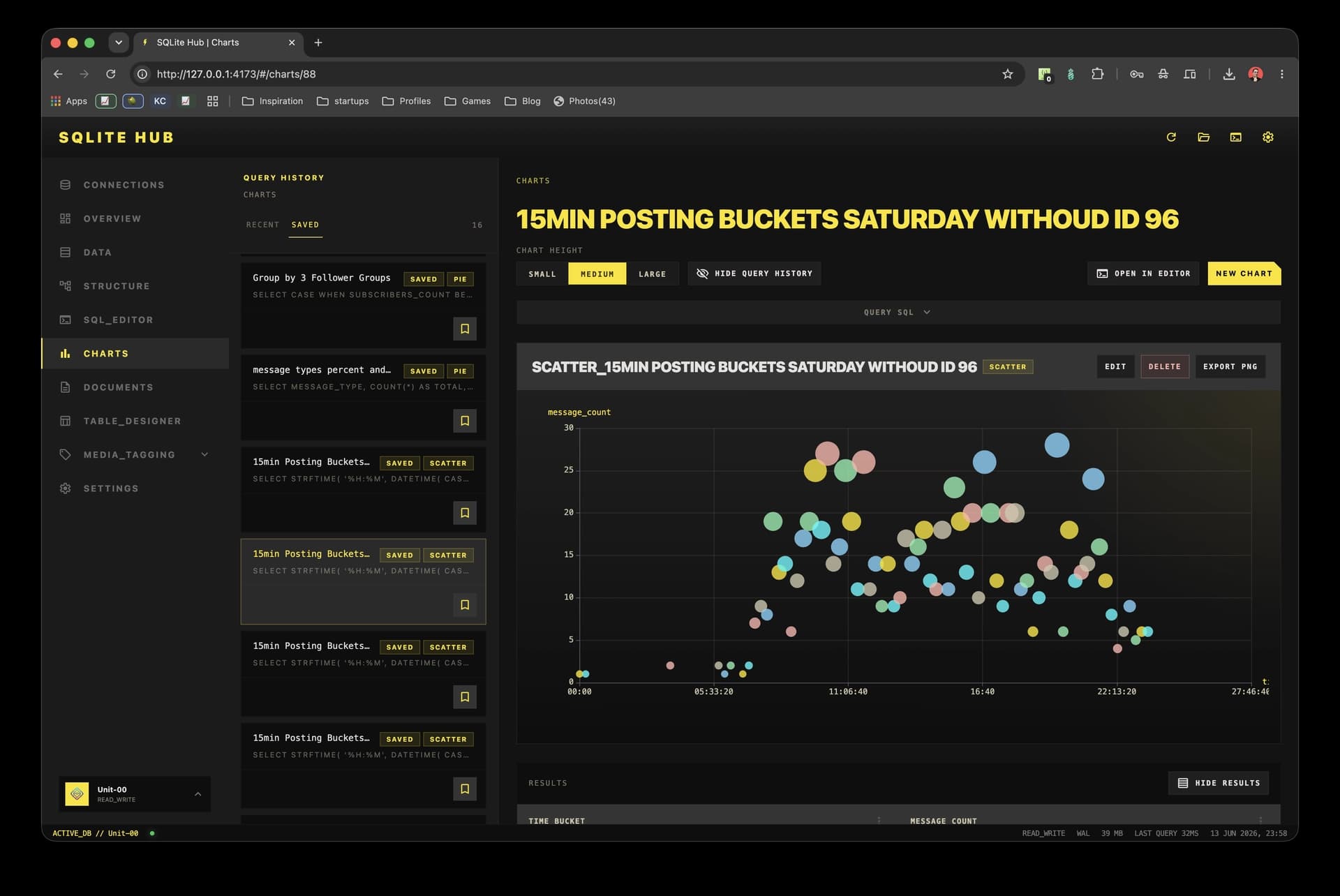
The application runs locally and lets users open or create SQLite databases, inspect database health, review schema details, browse tables, filter records, edit safely identifiable rows, run SQL queries, save useful queries, export results, generate charts, manage database-scoped Markdown documents, and inspect table relationships through a visual structure view. It also includes a Table Designer for creating and modifying tables with live SQL previews, validation, keys, defaults, constraints, and migration warnings.
A major focus of the project is practical data work. SQLite Hub is not only meant for developers writing SQL. It is also useful for journalists, analysts, founders, researchers, indie hackers, and technical operators who collect, clean, structure, and interpret local datasets. A journalist can use it to analyze scraped public data, document findings beside the database, export selected results as Markdown or CSV, and generate charts for further reporting. A developer can use it to inspect an app database, debug schema issues, run saved queries, and export rows or tables through the built-in CLI. A researcher can maintain notes, saved SQL queries, and visualizations close to the underlying dataset.
The CLI extends the same local workflows into the terminal. Users can start and configure the app, list imported databases, inspect tables, run or export saved queries, print or export Markdown documents, and export individual rows as JSON. This makes SQLite Hub useful both as an interactive browser-based tool and as part of repeatable command-line workflows.
The next development step is to add an AI-assisted layer that respects the local-first philosophy of the product. The goal is not to replace SQL or hide the database from the user, but to make database work faster and more understandable. Planned AI features include schema-aware query assistance, natural-language explanations of database structures, suggestions for data-cleaning steps, automatic documentation drafts, query result summaries, anomaly detection, and guided transformations for non-expert users. For example, a user could ask what a database contains, which tables are related, how to write a query for a specific question, or how to turn a result into a report-ready summary.
SQLite Hub is built around transparency, user control, and practical utility. Users should always understand what happens to their data, see the generated SQL before destructive or structural actions, and decide when AI assistance is used. The long-term vision is to make SQLite Hub a powerful local data workspace for the growing number of people who use SQLite as the backbone of small products, internal tools, research pipelines, AI datasets, and personal knowledge systems.
66 people supporting this launch
4.8
6 ratings

Founder @ dynamiq. | Tech- & Wirtschaftsjournalist | 15+ Years in Tech

AI video with native sound, paid per clip. Nothing stored.

A calmer Mac menu bar, one click away.

Enterprise Software. Intelligent Automation. Global Impact.


Comments
22I like the local-first angle here. SQLite often sits in the middle of research, prototypes, and small internal tools, but the workflow usually jumps between a browser, terminal, notes, and exports. Bringing schema review, saved queries, markdown notes, and charts into one workspace feels especially useful for people who need to understand a dataset before deciding whether it should become a larger system.
Founder @ dynamiq. | Tech- & Wirtschaftsjournalist | 15+ Years in Tech
Exactly, that’s very close to the problem I’m trying to solve. SQLite is often treated as "just a file", but in practice a lot of real work happens around that file: exploring data, testing queries, documenting assumptions, creating quick visualizations, and eventually deciding what comes next. My goal with SQLite Hub is to keep as much of that workflow as possible in one local-first workspace without forcing the database into a larger stack too early.
Free Online SVG to PNG Converter — Fast, Private & No Upload Required
Great tool, what's the difference between this and drizzle?
Founder @ dynamiq. | Tech- & Wirtschaftsjournalist | 15+ Years in Tech
Drizzle and SQLite Hub solve different problems. Drizzle is primarily a TypeScript ORM and database toolkit for application development, while SQLite Hub is a local-first workspace for directly working with SQLite databases: inspecting data, editing rows, running SQL, designing tables, searching across databases, creating charts, documenting schemas, managing backups, and importing or exporting data. The closest overlap is Drizzle Studio, but even there the perspective is different: Drizzle Studio starts from the application and Drizzle project, while SQLite Hub starts from the database itself.
12121212121212121212121
Founder @ dynamiq. | Tech- & Wirtschaftsjournalist | 15+ Years in Tech
23?
Really useful idea. SQLite is everywhere in prototypes, AI workflows, internal tools, and small products, but working with it often means switching between DB browsers, terminal, notes, exports, and charts. Bringing local-first database inspection, saved queries, Markdown docs, visual structure, charts, and CLI workflows into one focused tool feels very practical. Excited to see where the AI-assisted layer goes next.
Founder @ dynamiq. | Tech- & Wirtschaftsjournalist | 15+ Years in Tech
Thank you, that’s exactly the direction I’m aiming for. SQLite is incredibly capable, but the workflow around it is often surprisingly fragmented. SQLite Hub is my attempt to bring those everyday tasks into one local-first workspace without turning a simple database into a heavy platform. The AI-assisted layer is definitely one of the areas I’m most excited to explore next, especially around understanding schemas, generating queries, and working with unfamiliar datasets.
The local-first stance is what makes this stand out — no cloud lock-in, and showing the generated SQL before any destructive action is exactly the right call for trust. I like that it's aimed at journalists and analysts too, not just SQL-fluent devs. The planned schema-aware AI layer sounds promising as long as it keeps that transparency. Solid work!
Founder @ dynamiq. | Tech- & Wirtschaftsjournalist | 15+ Years in Tech
Thank you, that’s exactly the direction I’m aiming for. SQLite is incredibly capable, but the workflow around it is often surprisingly fragmented. SQLite Hub is my attempt to bring those everyday tasks into one local-first workspace without turning a simple database into a heavy platform. The AI-assisted layer is definitely one of the areas I’m most excited to explore next, especially around understanding schemas, generating queries, and working with unfamiliar datasets.
this looks interesting, i'm going to have to check it out for my website
Founder @ dynamiq. | Tech- & Wirtschaftsjournalist | 15+ Years in Tech
Thank you
Founder of AVEXII - A dedicated platform for AI videos
Local-first is exactly the right call here. The number of people working directly with SQLite files who don't want to be pushed into a cloud platform is way bigger than most tools assume, journalists, researchers, indie hackers all sit in that gap. The bit that stands out to me is keeping the SQL visible before destructive or structural actions. That transparency is what separates a tool people trust with real data from one they don't. Same principle applies to the planned AI layer, assisting without hiding the database is the right instinct. Nice work bringing all those scattered workflows into one focused workspace. Bookmarking this.
Founder @ dynamiq. | Tech- & Wirtschaftsjournalist | 15+ Years in Tech
Thank you, this really captures the philosophy behind the project.
It looks quite good, give it a try
Founder @ dynamiq. | Tech- & Wirtschaftsjournalist | 15+ Years in Tech
Thanks
just an ai developer
The CLI parity is the underrated part here — being able to run saved queries and export Markdown docs from the terminal means the same workflows can live in scripts and cron jobs, not just the UI. One question about the planned AI layer: will it run against a local model, or does data leave the machine? Given the local-first pitch and the journalist/evidence use case, that choice matters a lot.
Founder @ dynamiq. | Tech- & Wirtschaftsjournalist | 15+ Years in Tech
Its a MCP server you can plug it into Claude, Codex whatever understands MCP
Hardware Engineer & Web Developer. Founder of Insidious Builds and Peak Visibility.
the design layout looks incredible!
Founder @ dynamiq. | Tech- & Wirtschaftsjournalist | 15+ Years in Tech
Thank you
Really cool project, love the type support
Migration tool to move personal data from Meta and X to BluSky
Local-first SQLite (file stays a file, no hosted DB) is exactly the trust model we need when the DB holds user upload/session data. The combo of GUI + CLI + loopback API (and MCP) is what stood out — especially read-only mode and per-database tokens so you can explore without risking a bad UPDATE. We ship a product that still uses SQLite for local/dev platform state (and Postgres in prod). Curious: how do you handle large TEXT/JSON columns and attachments when browsing — pagination in the grid, or “open cell” on demand? Also, any guidance for opening a hot DB that’s also in use by a running app (WAL / copy-first workflow)?