
Convert static PDFs into interactive, responsive flipbooks.
Most business documents end up dead on arrival, rotting away in someone's "Downloads" folder. We built our tool to solve that exact headache. If you're looking for a reliable pdf to flipbook converter, you can just drop in any static document and instantly transform it into a responsive HTML5 publication. It gives your readers that crisp, smooth page-turn effect that actually feels fun to interact with.
Having spent years shipping digital marketing assets, we know the score: when a prospect has to download a massive file just to see your pitch, bounce rates go through the roof. Flipping through an interactive digital publication keeps eyes glued to the screen—whether you're sending out client proposals, product catalogs, or restaurant menus.
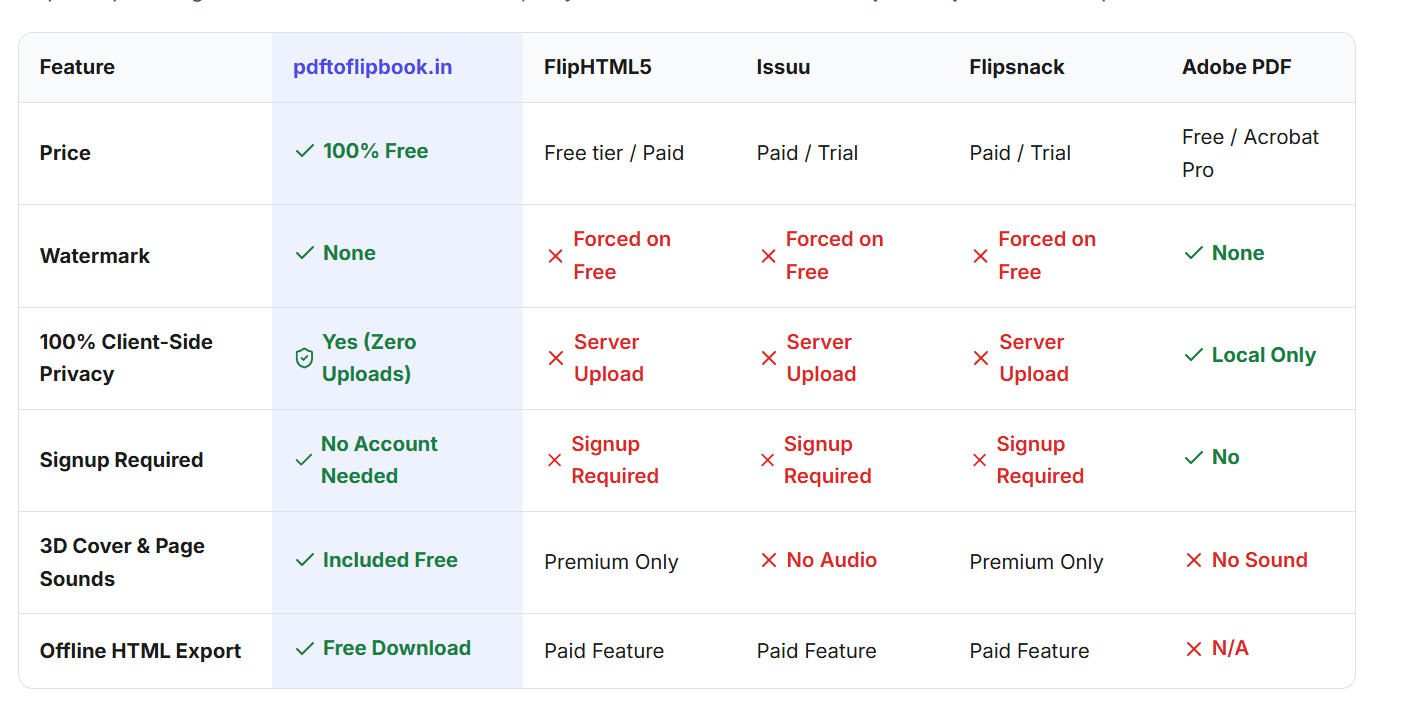
Why it hits different:
Stop losing leads to lifeless downloads. Run your first file through and see what real reader retention looks like today.
53 people supporting this launch
4.8
6 ratings
https://pdftoflipbook.in/

AI video with native sound, paid per clip. Nothing stored.

A calmer Mac menu bar, one click away.

Enterprise Software. Intelligent Automation. Global Impact.


Comments
12Creator of Contractor OS — a job costing and profit tracking system for contractors.
Turning a static PDF into a responsive web experience is a useful idea, especially for proposals and product catalogs. I like that the original links remain clickable and readers don't need to install anything. Can users also see analytics such as page views, reading time, or which pages get the most attention?
Preserving the original PDF links is useful for catalogs and proposals. Does the viewer expose selectable text and a reading order for screen readers, and is there a plain PDF fallback?
Turning static, heavy PDFs into clean, interactive flipbooks makes a huge difference for reader engagement—especially on mobile devices. Perfect for portfolios, digital catalogs, and pitch decks.
GuestNiche: SEO tools for audits, keyword research, link building and content planning. https://guestniche.com/
Keeping original hyperlinks makes this useful for resource guides. Can authors replace the source PDF while keeping the same hosted URL, and can they unpublish it later? Clear controls for revisions and link permanence would be valuable for regularly updated guides.
The keyboard-first design is a smart choice for power users. The command palette feels fast. Any plans for a mobile version, or is this staying desktop-focused?
The keyboard-first design is a smart choice for power users. The command palette feels fast. Any plans for a mobile version, or is this staying desktop-focused?
We just published a few reports as flipbooks on the big platforms and hit two issues worth asking about. First, links inside the PDF: on some viewers the clickable links in the original document stop working or need extra clicks, which matters a lot for reports full of source links. Do internal and external PDF links stay clickable in your HTML5 output? Second, does the flipbook render the PDF text as indexable HTML, or only as page images? That decides whether the content can be found in search.
Could the flipbook offer a print-friendly download that preserves the original page dimensions? That would make it useful for printable activity packs: readers could browse online, then print individual worksheets without the page-turn interface.
Nice! I really like how it keeps my original links.
Building products for the future, and breaking biases
Okay this is a really good one
Much needed and useful for presenting effectively
Solo maker in Copenhagen building small web tools that do one job well, under the name U-Things.
Nice flipping effect. It would be also nice if the fullscreen moved removed also header and footer, for a more immersive experience.