
Windows desktop automation with OCR, UI Automation
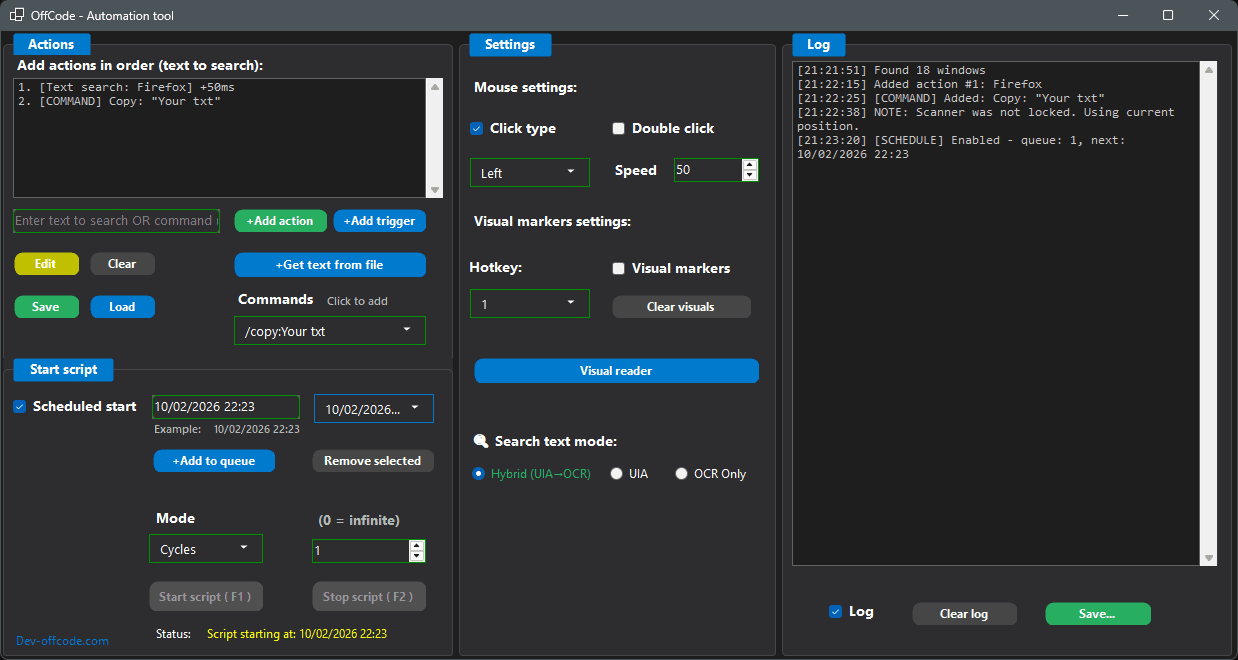
OffCode Automation Tool — a powerful Windows desktop automation application that can automate virtually anything you do on your computer. Think of it as a "robot" that can see your screen, find text or buttons, and perform actions like clicking, typing, and navigating – just like a human would.
The application combines three key technologies: OCR (Optical Character Recognition) reads text directly from your screen, UI Automation finds buttons and controls using Windows' built-in accessibility features, and mouse/keyboard simulation performs actions automatically. This powerful combination allows you to automate tasks that would otherwise require manual intervention.
Text Detection
Find text on screen using OCR
Visual Reader
A real-time scanner overlay that follows your cursor or stays locked in position. Choose between circle or rectangle scanning area. Monitor specific screen regions continuously and collect text as it appears. Perfect for monitoring dynamic content, game timers, chat messages, or any changing text on screen.
Visual Markers
Place numbered green markers directly on your screen to mark important click locations. Markers display coordinates and labels, making it easy to return to exact positions. Use markers in your automation scripts for reliable clicking at fixed positions.
Scanner Triggers
Create advanced automation triggers using the Visual Reader. Use `[WAIT FOR TEXT] "message"` to pause your script until specific text appears in the scanner area. Use `[WAIT GONE] "message"` to wait until text disappears. This enables conditional automation based on screen content changes.
Mouse & Keyboard
Automated interactions
Action System
Build automation sequences
Text list for automation
Use a list of lines (e.g. search terms, messages, usernames) and feed one line per script step into the clipboard.
Supported Commands
Available script commands (typed or chosen from the dropdown)
Scheduled Start
Run your script at specific times automatically
Multi-Region Visual Reader
Read text from multiple visual boxes simultaneously
Read / Click Inside
Reads and interacts only within visual box boundaries
4.8
6 ratings


AI video with native sound, paid per clip. Nothing stored.

A calmer Mac menu bar, one click away.

Enterprise Software. Intelligent Automation. Global Impact.


Comments
7The hybrid OCR + UI Automation approach is clever. Most automation tools force you to pick one or the other, but combining them covers way more edge cases - especially for apps that render text as images or use custom UI components. The Visual Reader with real-time scanning is interesting too. How does it handle high-DPI displays? OCR accuracy tends to drop on scaled screens if not handled properly.
That's a great observatio! High-DPI scaling is where many automation tools fail. In this project, we've handled it on two levels: On the UI Automation side, we use native Windows TryGetClickablePoint methods. These interact with the OS at a level where scaling is already factored in, so the 'clickable' coordinates remain accurate regardless of whether your display is at 100% or 250%. For the Visual Reader (OCR), we've built a dedicated preprocessing pipeline to maintain accuracy on high-res screens. Before the OCR even looks at the screen, the captured area undergoes a 3x upscaling using high-quality bicubic interpolation. We then apply blue-channel isolation and a dilation filter to sharpen the text edges and remove the 'blur' that Windows scaling sometimes introduces. This ensures the OCR sees crisp, high-contrast characters even on a 4K display with high scaling settings.
Congrats on the launch Using OCR and UI automation to remove repetitive work is powerful stuff for saving teams serious time and effort. I specialize in SaaS and automation-tool demo videos that help products like yours clearly show their value and attract more users. I already have a concept in mind for how a short 60-second video could highlight OffCode’s impact happy to share it if you’re open to
Thank you! Yes I am interested!
Independent developers create products that users love to see and hear.
Congratulations on your launch. Great idea. It would be even better if the UI was more beautiful.
Thanks! I'm not 100% satisfied with the UI yet either, so I'm definitely planning to give it a more modern look soon.
s
As a developer, I'm always looking for ways to cut down on boilerplate and focus on the core logic. Offcode seems to hit that sweet spot between flexibility and automation. The fact that it handles serverless execution without the infra headache is a massive win. Congrats on the launch!