
Image to Text Instantly. Supports 109 languages. No Internet
4.8(6)4Productivity
Kaizen OCR - Fast & Accurate Text Extraction Tool
Turn any image or screenshot into editable text with Kaizen OCR, the lightweight and powerful OCR desktop software for Windows. Whether you’re scanning documents, extracting text from screenshots, or working with multilingual content - Kaizen OCR delivers speed, accuracy, and simplicity in one package.
Multiple OCR Modes
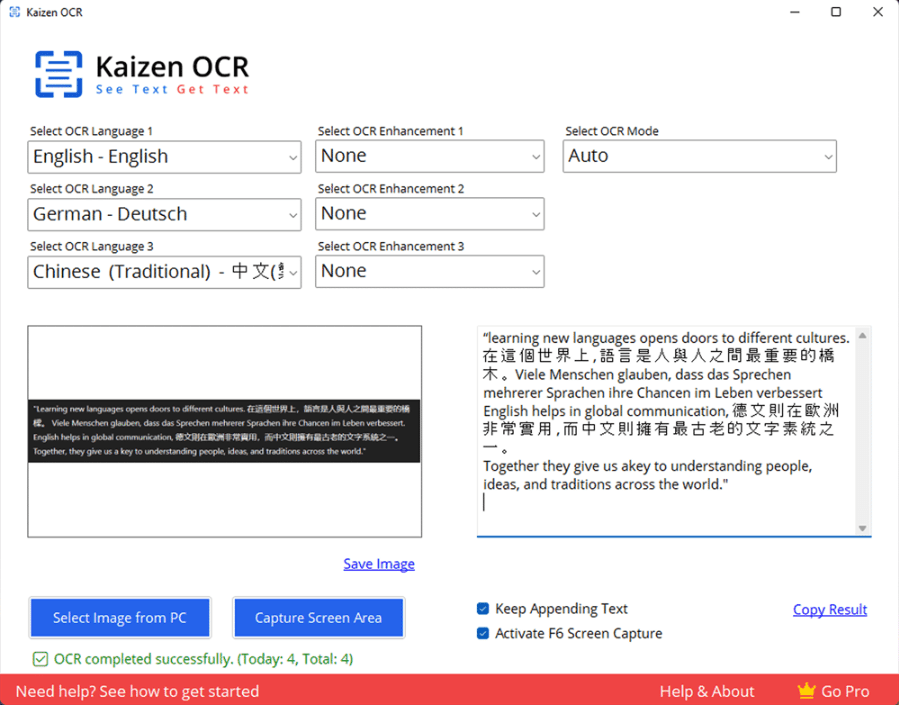
Choose from advanced modes like Auto, RawLine, SingleBlock, SingleWord, SparseText, and more for precise text recognition.
Image Enhancements
Improve OCR results with built-in tools like Noise Removal, Binarisation, Borders, Rotation/Deskewing, Rescaling, and Transparency handling.
Multilingual OCR
Extract text in 109+ languages — from English and Spanish to Japanese, Korean, and Chinese.
Flexible Input Options
Upload images directly from your PC or capture any screen area instantly.
Smart Text Handling
Append multiple results, copy extracted text with one click, or enable auto screen capture with the F6 shortcut.
High Accuracy
Powered by advanced OCR technology for clean, reliable results — even from blurry or low-quality images.
Privacy First
No tracking, no uploading. Your images and data never leave your machine.
Fully Offline — No Internet Needed
Unlike Google Lens, Kaizen OCR runs 100% offline. Perfect for private, secure, and fast text recognition.
✔ Instant Text from Screenshots & Images
✔ Text Extraction
✔ Education & Learning
4.8
6 ratings
Founder Kaizen-apps, Director, Ex CTO, Top Rated Freelancer, Passionate Problem Identifier and Solver

AI video with native sound, paid per clip. Nothing stored.

A calmer Mac menu bar, one click away.

Enterprise Software. Intelligent Automation. Global Impact.


Comments
4doing the marketing business
To be honest, one of the biggest issues I face when using OCR is the poor quality of the scans, and then there's the challenge of processing the text after scanning. This tool seems to solve both problems right from the start.
florist pos software
Really impressed by Kaizen OCR’s emphasis on privacy and full offline operation — that’s a major differentiator for users handling sensitive documents. The built-in image enhancements like noise removal and rotation/deskewing are smart touches. A couple of questions: 1. How does the OCR performance scale with low-resolution or heavily compressed images? 2. Do you plan to support batch processing of multiple images in one go (e.g. entire folder) in future versions?
CPO @ Mewayz Global
Such a timely tool. Extracting text from image just got easier.
Nice OCR quality, even on bad quality document, Would love not to have to download an app on desktop and to have it direclty on the website