
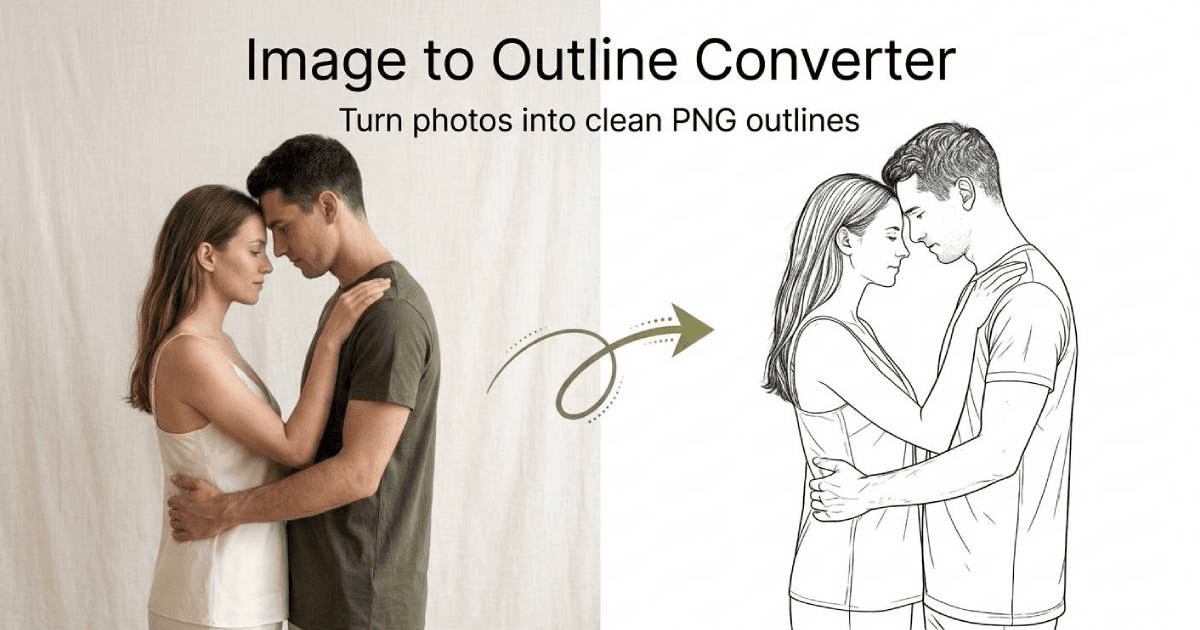
Image Outliner is a free online tool that converts photos, logos, PNGs, and artwork into clean outlines, line drawings, edge maps, printable stencils, sticker borders, and Cricut-friendly cut lines.
Upload an image, choose an outline style, adjust width, smoothing, threshold, color, and background, then download a clean PNG for craft projects, stickers, coloring pages, laser cutting, worksheets, or design drafts.
- Convert photos, logos, PNGs, and artwork into clean outlines
- Create multiple output styles: clean outline, line drawing, edge map, stencil, sticker outline, and Cricut cut lines
- Adjust outline width, smoothing, threshold, color, and background
- Preview results instantly in the browser before downloading
- Export clean PNG files for design, craft, print, and publishing workflows
- Optional AI enhance for cleaner, more polished outline-style results
- Create outline images for stickers, decals, and printable crafts
- Turn photos into line drawings or coloring-page style assets
- Make stencil references for painting, tattoos, screen printing, and DIY projects
- Generate Cricut-friendly cut line references for vinyl, stickers, and Print Then Cut planning
- Prepare simple visual assets for worksheets, book graphics, design drafts, and social content
- Extract edge maps from images for tracing, reference, or creative experiments
4.8
6 ratings

AI video with native sound, paid per clip. Nothing stored.

A calmer Mac menu bar, one click away.

Enterprise Software. Intelligent Automation. Global Impact.


Comments
12I built Image Outliner because I kept seeing creators, crafters, teachers, and small business owners need simple outline-style images without opening heavy design software. The goal is to make one narrow workflow fast: upload an image, choose the outline style you need, adjust a few practical controls, and download a clean PNG for stickers, stencils, Cricut projects, worksheets, coloring pages, or design drafts. I would love feedback from people who use image outlines in real projects, especially around export formats, outline quality, and which creative workflows should be supported next.
I SaaS builder creating tools and directories that simplify workflows.
Nice utility! Converting images into clean outlines usually requires multiple design tools, so having everything in one place is really convenient.
Use Mauricette Calculatrice for accurate work time calculation
This is such a fun little tool honestly. My sister does a ton of Cricut projects and I remember watching her manually trace outlines in some clunky software for like 30 minutes just to make one sticker — she would've loved this. The fact that it handles cut lines, stencils, AND coloring-page style outputs in one place instead of needing three different tools is genuinely useful, not just a gimmick. Gonna send this her way and probably mess around with it myself for some sticker ideas I've had sitting in my notes app forever lol. The "adjust threshold and smoothing" bit is a nice touch too — most free tools like this give you zero control and the output looks messy. Excited to try it
Building browser-based image tools myself, so I appreciate how narrow and fast this workflow is. Since you asked about export formats: an SVG option would be big for the Cricut/laser crowd — PNG cut lines often need retracing in Design Space before cutting. A live preview while dragging the threshold slider would also save trial-and-error on photos with busy backgrounds. Outline quality on a logo I tested came out clean.
Nice utility! Converting images into clean outlines usually requires multiple design tools, so having everything in one place is really convenient.
The focus on practical controls is strong: threshold, smoothing, and background handling are exactly what determine whether an outline is usable beyond a quick preview. For Cricut and laser-cutting workflows, an SVG export or a clean vector-trace handoff would make this especially compelling, since users often need to edit the path after generating it.
Great tool to have if you are a designer upvoted.
Really useful tool for turning creative ideas into practical assets. The ability to transform images into clean outlines, stencils, and sticker-ready designs makes it great for creators, makers, and anyone working on crafts or visual projects. Love the simplicity of adjusting the style and getting a ready-to-use PNG.
Full-stack developer crafting web applications with a great team.
It's easy to use and helpful !
Great UX, really intuitive to use!
Data science
Image Outliner has great potential! A few improvements could make it even better. I'd love to share my feedback and suggestions. WhatsApp: https://wa.me/447307349530 Telegram: t.me/rforrank
Building a no-code solutions
I think more customization needs to be done. Because even in your images all the outlines looks almost the same