

500+ free browser tools for everyday tasks
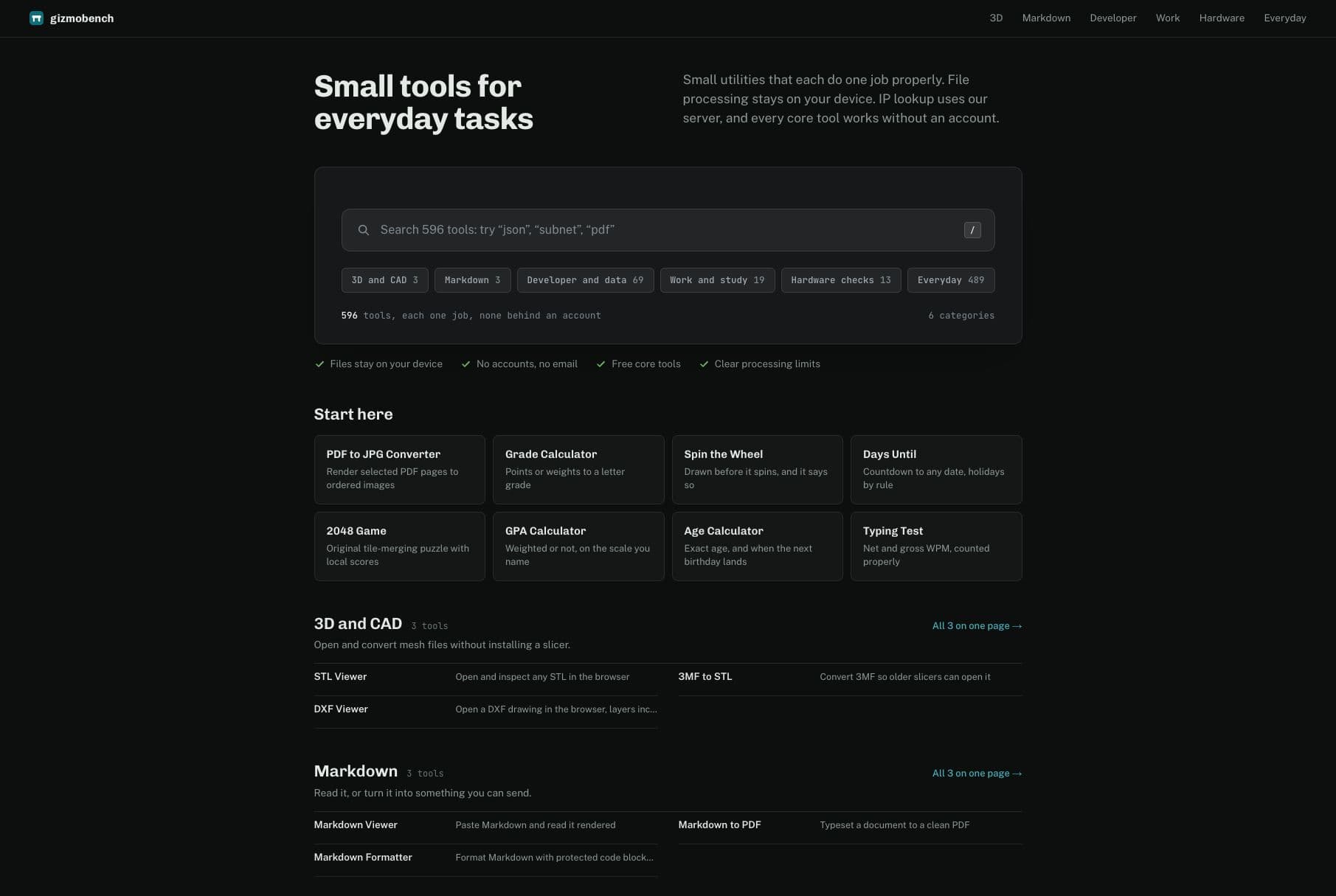
GizmoBench is a collection of 500+ practical browser tools for the small tasks that interrupt your day. Compare JSON, format code, convert files, calculate grades and dates, check hardware, or open 3D files—all from one searchable site.
The collection spans six categories: 3D and CAD, Markdown, developer and data, work and study, hardware checks, and everyday utilities. Every core tool is free and works without an account.
File processing stays on your device. IP lookup uses our server, and individual tools explain their processing limits. Start with the task you need to finish and use the tool directly.
• 500+ searchable browser tools across six categories.
• Every core tool is free and works without an account.
• Structural JSON comparison that ignores object-key order and whitespace.
• File conversion, code formatting, calculators, hardware checks, and 3D file viewers.
• On-device file processing, with processing limits explained by each tool.
• Developers can compare JSON responses and format code.
• Students can calculate grades and date intervals.
• Designers can inspect 3D and CAD files in the browser.
• Anyone can convert files, check hardware, and finish everyday utility tasks.
4.8
6 ratings


AI video with native sound, paid per clip. Nothing stored.

A calmer Mac menu bar, one click away.

Enterprise Software. Intelligent Automation. Global Impact.


Comments
38Hi everyone! GizmoBench brings 500+ practical tools into one searchable site. Every core tool is free and works without an account, and file processing stays on your device. Try JSON Diff for structural comparisons, Markdown Viewer for instant previews, or one of the everyday calculators. I’d love feedback on where the workflow could be clearer and which small task you would like a tool for next.
Building PZERO, saving you money - pzero.studio
Having 500+ browser tools for JSON, formatting, file conversion, calculations, and hardware checks, with the core set free and no account required, keeps quick utility work in one tab. When office AI bills need a lighter option, PZERO is at pzero.studio.
Thanks for taking the time to look through it! Making those everyday jobs easy to finish in one place, without an account, is exactly the goal. Glad that approach resonates.
Building Blastra, an AI tool that submits real products to real directories.
The fact that file processing stays on-device instead of round-tripping to a server is the detail that would get me to actually use this over one-off converter sites, most "free tool" collections quietly upload everything. Does the JSON diff tool handle large payloads client-side, or does performance drop off past a certain size?
Thanks for the thoughtful question! JSON Diff parses and compares both documents entirely in your browser; the JSON itself isn't uploaded. There isn't a fixed input-size cap, but large or deeply nested payloads can slow things down or hit browser limits. Performance depends on the document and your device, so I wouldn't promise a single safe size for everyone. Roughly how large are the payloads you usually compare?
I like that the JSON comparison ignores key order and whitespace, that is the annoying part of most diff tools when you only care about the data difference. Keeping file processing on-device is the right call too, since many free converters quietly upload everything. Quick question: is there a file-size limit per tool, and do the 3D/CAD viewers handle larger assemblies locally without lag?
Thank you! Limits vary by tool. For example, STL Viewer doesn't impose a file-size cap, but browser memory, model complexity and your device still set practical limits. The 3D viewers process files locally, though large models can lag, and support depends on the format. Which file format and approximate size are you working with? That would help me give you a more useful answer.
The six-category structure is what sells it for me. Having Markdown, developer/data, and hardware checks in one searchable place means I stop keeping ten single-purpose tabs open. The date and grade calculators are exactly the things I always end up googling mid-task. Do the hardware checks that read GPU or screen info work in Firefox too, or is it Chromium-only?
Glad the categories are helping! The Screen Size tool uses standard browser features available in Firefox, so it isn't Chromium-only. It reports screen and viewport dimensions and pixel ratio; privacy settings and zoom can affect those readings. One clarification: we don't currently have a dedicated GPU-identification tool. Were you looking for the GPU model, WebGL support, or a performance check?
Selzee is an AI-powered platform that generates on-brand social media ads, by analyzing top-performing ads in a brand's specific market.
perfect place for browsing the tools
Thanks, Simon! I'm glad you enjoyed exploring it. Hope you find a few useful tools to come back to.
Omnitwine founder
nice tool, maybe simplify ui
Thank you for the honest feedback. Finding a tool should feel as simple as using it. Was it the homepage, the navigation, or a particular tool that felt too busy? A concrete example would really help me understand what to simplify.
The on-device file processing is a smart default - most free-tools sites quietly upload everything to a server. And a JSON compare that ignores key order and whitespace is exactly the one I always need and never have bookmarked. 500+ tools with no account wall is rare. How do you decide which tools make the cut?
Thanks for asking! The guiding idea is a small, practical task with a clear result: compare two files, calculate something, or check a device. I want each tool to be useful without an account, with clear limits and local file processing. Is there a recurring task you'd particularly like to see covered?
LeadBoba
I like that the JSON comparison ignores key order and whitespace
Thank you, Sihyeon! The aim is to make the actual data changes easy to spot, even when a formatter has changed the layout. Glad that detail is useful to you.
浏览工具的完美之地浏览工具的完美之地浏览工具的完美之地浏览工具的完美之地
谢谢你的支持!很高兴你喜欢这里,希望这些小工具能帮你省下时间。
I tried the demo. The onboarding is quick, but I could not find how you handle duplicates when the same company shows up under two searches. Is it by domain or by name? That is the part that took me the longest on my own project.
The Podcast App
I've bookmarked a dozen of these single-tool sites over the years, and having 500+ searchable in one place solves my biggest frustration: remembering which tab had the JSON formatter. The structural JSON comparison that ignores key order is genuinely the feature I'd use weekly — diffing API responses where the keys shuffle between environments is a constant headache. One question: for the file conversion tools, is there a file-size ceiling where the browser starts to choke, and do the tools warn before attempting large files? Curious how you handle that gracefully.
The on-device file processing is the standout detail for me — so many free tool sites quietly upload your files to their servers, so keeping processing local (with each tool explaining what, if anything, leaves the device) builds real trust. The structural JSON comparison that ignores key order and whitespace is also exactly the right call; that's the part of diffing API responses that wastes the most time. With 500+ tools across six categories, my question for the maker: how do you keep quality consistent as the collection grows — is there a review process for new tools, or does the community flag broken ones?
Solo Developer builder Internet tools
Looks good, and me as a developer I'll use daily
The combination of on-device file processing and clearly separated categories sounds genuinely useful for quick everyday tasks. I especially appreciate that each tool explains its processing limits, which makes the collection easier to trust.
GizmoBench looks genuinely useful for the kind of small tasks that usually force people to jump between multiple websites. The combination of developer tools, file utilities, hardware checks, and everyday calculators in one searchable place is practical, and keeping most file processing on-device is a strong privacy-friendly touch.
Developer
Nice work consolidating all these utilities in one place. The on-device processing stance is exactly right — trust is the main currency for a tools site. One feature request that would make this sticky: recently-used / most-used tools on the homepage, so returning visitors skip search entirely. Also keyboard shortcuts (e.g. pressing a key per tool) would speed things up for power users. Keep going!
Founder
With 500+ tools across six categories, discovery must be a challenge — is there a favorites/pin system so you can keep your most-used tools one click away instead of searching every time?
Building SpeakerEject — free browser tools for water-eject sounds, speaker tests, and audio troubleshooting.
The on-device file processing and no-account access make the collection useful for quick jobs. Can a tool you have already opened still run offline, or does each visit need a connection to load its code? An offline indicator would help when working with files while traveling.
On-device file processing as the default is the detail that matters most — so many free tool sites quietly upload your files to a server. 500 tools is a lot to discover though; a recently-used or pinned-favorites section would make this my default utility drawer. Congrats on the launch!