

⚡ AI-powered YouTube summaries. Watch less, learn more. ✨
4.8(6)23ProductivityYouTubeExtensions
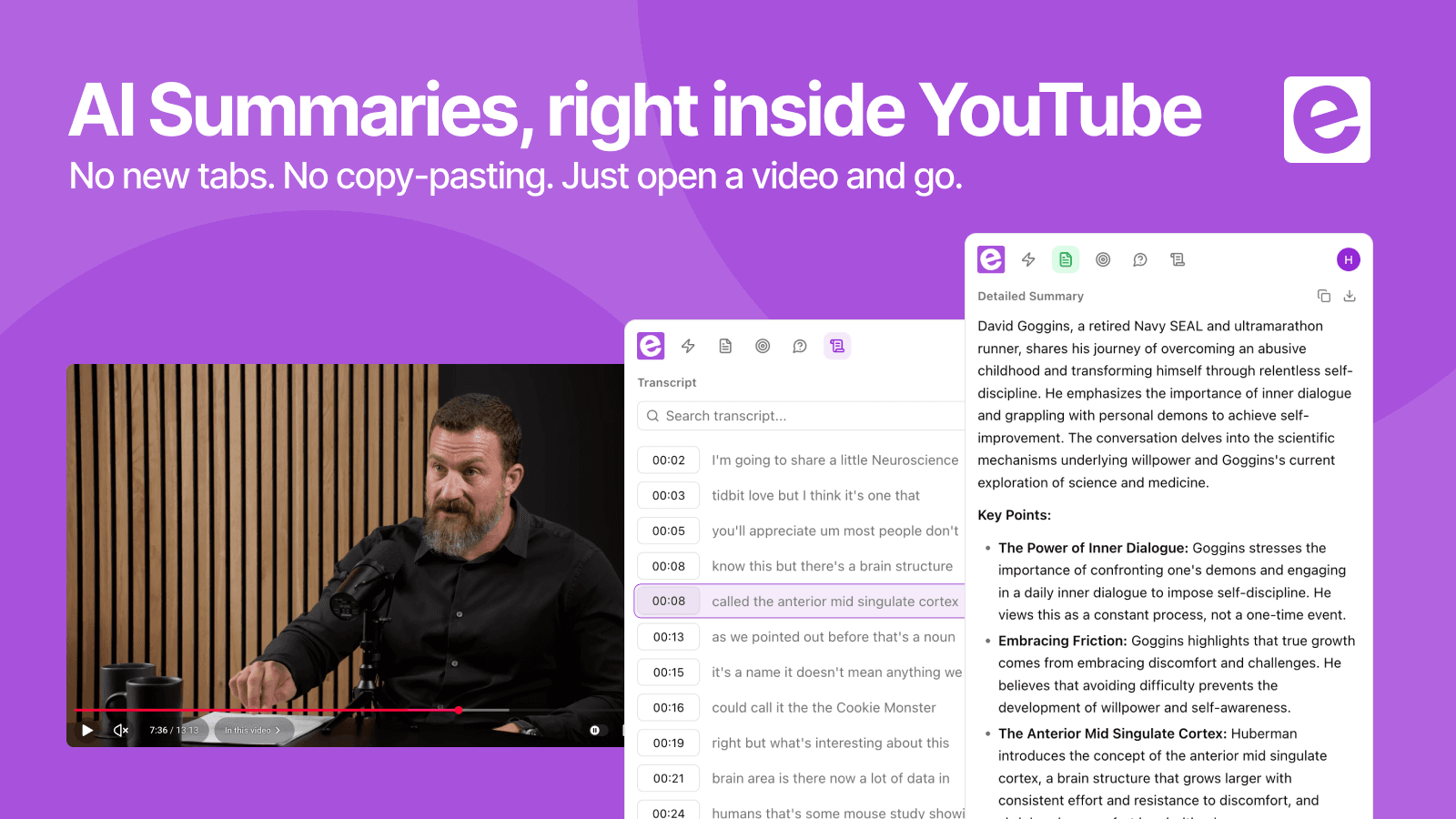
ekstrakt is a YouTube summarization tool available as a web app and Chrome extension. It generates AI-powered summaries in four formats — Short, Detailed, Straight-to-Answer, and Ask-a-Question — with clickable transcripts that jump to any moment in the video. Results stream in real time. It runs on any Chromium-based browser and works with Google, Apple, or email login.
47 people supporting this launch
4.8
6 ratings

Building tools that give your time back.

AI video with native sound, paid per clip. Nothing stored.

A calmer Mac menu bar, one click away.

Enterprise Software. Intelligent Automation. Global Impact.


Comments
23Building tools that give your time back.
Hey! 👋 I'm Huseyin, maker of ekstrakt. YouTube is the world's biggest library of knowledge — but every book takes an hour to read. I was tired of scrubbing through 40-minute videos for one answer, so I built the fix. Paste a link (or click right on the YouTube page with our Chrome extension) and get an AI summary in seconds.
Its look amazing and gorgeous
Building tools that give your time back.
Thank you, Rizu!
Really like the four summary styles — Short vs Detailed vs Straight-to-Answer covers both quick scanning and deep study well. The clickable transcript timestamps are a nice touch; jumping straight to the exact moment beats scrubbing through a 40-minute video. Question: does the Ask-a-Question mode work well on technical content like code tutorials or research talks, or is it tuned more toward conversational videos?
Building tools that give your time back.
Thanks! Ask-a-Question pulls answers directly from the video's transcript, so it works on any spoken content. Code tutorials and research talks included. The main caveat: it can only "see" what's said out loud, so if a tutorial shows code on screen without narrating it, that part won't be captured. For talks/lectures where the speaker walks through their reasoning verbally, it holds up well.
Really like the four summary styles — Short vs Detailed vs Straight-to-Answer covers both quick scanning and deep study well. The clickable transcript timestamps are a nice touch; jumping straight to the exact moment beats scrubbing through a 40-minute video. Question: does the Ask-a-Question mode work well on technical content like code tutorials or research talks, or is it tuned more toward conversational videos?
The combination of multilingual summaries and clickable timestamps looks really useful, especially for people learning from videos in another language. I also like that users can choose between a quick summary, a detailed version, or ask a specific question instead of getting the same generic output every time. Are you planning to add a way to highlight and save key phrases directly from the transcript? Great work!
Building tools that give your time back.
Thanks so much for your feedback, Vitaly! Highlighting and saving key phrases straight from the transcript is a really good idea. we don't have it yet, but it fits naturally with the existing summary/transcript view, so it's on our radar for a future update. Appreciate you flagging it. Feedback like this directly shapes what we prioritize next!
Founding Team Member at Third Prism | AI Simulation for High-Stakes Decisions
The Straight-to-Answer mode is a smart feature for finding exactly what you need without scrubbing through videos.
Building tools that give your time back.
Thank you so much!
The 'jump straight to the conclusion' flow is genuinely useful — most summarizers just dump a TL;DR, but being able to skip the intro, sponsor reads, and padding in a how-to video is the part that actually saves time. Ask-a-Question sourcing answers from the transcript is also a strong differentiator for long podcasts and interviews. Two things I'd love to know: do summaries preserve timestamps so you can jump back to the exact moment in the original video, and how does cross-language mode handle videos that mix languages mid-sentence? Also, an export option (Markdown or notes) would make it easy to move insights into a second-brain tool. Great launch!
Building tools that give your time back.
Thanks for the detailed feedback! Good question on mixed-language handling. That's a genuinely hard edge case, and we haven't tuned specifically for mid-sentence code-switching yet, so results there may be inconsistent. Something we want to improve. Export to Markdown/notes is a great shout too. Not there yet, but it's already on our list. Appreciate the thoughtful comment!
Data science
ekstrakt has great potential and offers some useful features, but I encountered a few issues that could be improved. Please contact me so I can share detailed feedback and suggest the changes I'd like to see. Email: [email protected]
cool~~~~~~~~~~~~~~~~~~~~~~~~~~
Building tools that give your time back.
Thanks a lot, Jaysean!
This is exactly the kind of tool I wanted to build myself. It’s great that you’ve made it work directly in the browser - I’ll install it and give it a try. Do you also have a mobile app where I can simply share a YouTube link, get a summary, and then chat with the AI about the video?
Building tools that give your time back.
Thanks Gleb. Hope you enjoy the extension! No mobile app yet, but a share-a-link-and-chat experience is on the roadmap. For now, the extension and web app give you that same summarize + ask-questions flow.
software develpment
easy to use software
SE
ekstrakt has great potential and offers some useful features
i write a16z speedrun scout checks within 24hours | Co-Founder & CTO at Dial AI
The video learning friction here is genuinely compelling. Most professionals and students struggle because they either need to watch entire videos to find one key insight, manually take notes while watching (splitting attention), or rewatch sections trying to remember which timestamp had the information they need. The traditional path means losing hours to videos that could be 10-minute reads, struggling to quote specific moments accurately, or giving up and not learning the material. ekstrakt removes that friction entirely by generating summaries on demand in four different formats and making transcripts clickable to jump to exact moments. Being able to decide upfront whether a video is worth watching through a Short summary, then deep-dive with a Detailed breakdown if needed, transforms what felt like a time investment gamble into a confident decision. For researchers, students, and teams managing professional development especially, that ability to extract knowledge from video without the time sink is what changes the game from dreading long-form content to actually utilizing it as a learning resource.
Smart idea, will test it out
Indie developer. Elf Names Wiki: https://www.elfnames.wiki/
it looks great to me. save my time.
Tried it, it has potential but there are some bugs that are making the software tedious