
EasySwitch turns your Mac, Windows, and Linux computers into one seamless workspace.
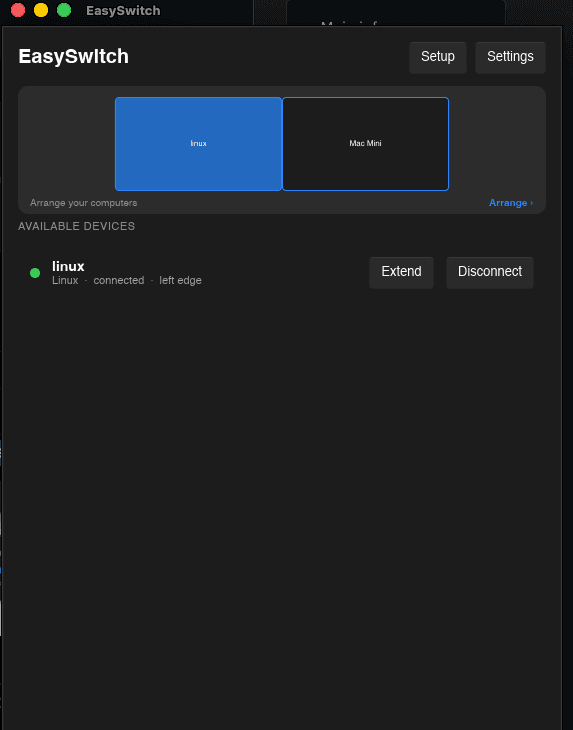
Move your cursor across screen edges just like using multiple monitors, while your keyboard, clipboard, and files follow you between machines. You can also use keyboard shortcuts to switch instantly.
Now with Virtual Display, EasySwitch can also turn another computer into an extended display — giving you more screen space without buying another monitor.
Everything works over your local network with end-to-end encryption. No cables, no hardware KVM, no screen streaming, and no subscription required for the core experience.
Perfect for developers, creators, power users, and anyone who works across multiple computers.
Multi-computer developers
Use your Mac for development, Windows for testing, and Linux for servers or development environments — while controlling everything from one keyboard and mouse.
Developers with multiple machines
Keep several computers active on the same desk without filling your workspace with keyboards, mice, and KVM hardware.
Extended-screen setups
Turn another computer into a virtual display when you need extra screen space but don't want to buy another monitor.
Designers & creators
Keep your main workstation and secondary machine side by side and move files, clipboard content, and input between them instantly.
Mac + Windows workflows
Work across macOS and Windows without constantly reaching for another keyboard or mouse.
Laptop + desktop setups
Use your laptop alongside your desktop as if both were part of the same workstation.
Remote or hybrid workers
Keep multiple work machines organized on one desk and switch between them without constantly reconnecting peripherals.
Power users
Build a multi-machine workspace where several computers feel like one continuous desktop.
77 people supporting this launch
4.8
6 ratings


software enginner

AI video with native sound, paid per clip. Nothing stored.

A calmer Mac menu bar, one click away.

Enterprise Software. Intelligent Automation. Global Impact.


Comments
80software enginner
I built EasySwitch because I got tired of treating my own computers like separate worlds. As a developer, I often work across multiple machines — Mac, Windows, and Linux. Switching keyboards, mice, files, and clipboard between them felt unnecessarily painful. Existing solutions either required extra hardware, were focused on remote access, or didn’t give me the seamless experience I wanted. So I started building EasySwitch. The idea is simple: make multiple computers feel like one workspace. Move your cursor across screens, share your keyboard and mouse, copy/paste between devices, transfer files, and now even use another computer as a virtual display. It started as a problem I wanted to solve for myself. Now I’m opening it up to everyone. If you work with multiple computers, I’d genuinely love to hear how you currently handle it — and what still feels annoying. Try EasySwitch and tell me what you think.
engineer
EasySwitch looks genuinely useful for anyone juggling several computers throughout the day. I regularly move between a laptop and desktop, and copying files or switching keyboards can interrupt my concentration more than expected. The shared clipboard and cursor movement would make that setup feel much closer to using one large workstation. I’ve dealt with Pavilion customer service https://www.pissedconsumer.com/company/pavilion/customer-service.html while sorting out a computer issue before, which reminded me how much I prefer software solutions that avoid adding extra hardware. Virtual Display is a clever bonus too, especially when traveling or working somewhere without room for a second monitor. The local-network approach also sounds convenient.
software enginner
Really appreciate this, Jason. That’s exactly the problem we’re trying to solve , making multiple computers feel like one workspace without adding another piece of hardware. And yeah, Virtual Display is especially handy when you’re traveling. The fact that everything stays on the local network was also a big part of why we built it this way. Thanks for giving EasySwitch a look!
Keeping everything on the local network with end-to-end encryption is a strong alternative to cloud-based remote-access tools.
software enginner
Yeah, that was a big part of why I built it.
Product builder and founder of Buddymantra & QuoteThought. Building data-driven products, AI workflows, and tools that solve real-world problems.
EasySwitch is a clever productivity tool that makes working across multiple computers feel effortless. The seamless keyboard, mouse, and file sharing is a great idea!
Product builder and founder of Buddymantra & QuoteThought. Building data-driven products, AI workflows, and tools that solve real-world problems.
EasySwitch is a clever productivity tool that makes working across multiple computers feel effortless. The seamless keyboard, mouse, and file sharing is a great idea!
https://flico.art, https://picavo.co
cool! Now with Virtual Display, EasySwitch can also turn another computer into an extended display — giving you more screen space without buying another monitor. Everything works over your local network with end-to-end encryption. No cables, no hardware KVM, no screen streaming, and no subscription required for the core experience.
software enginner
Thanks! If you try Virtual Display, let me know how it runs on your setup.
Founder of CollabVue, helping brands find local creators.
A one-keyboard, one-mouse setup sounds like a practical way to reduce friction when switching between machines. The focus on making this simple should resonate with people managing both work and personal systems.
Finding tools that genuinely save time without adding complexity can be a challenge. EasySwitch (easyswitch.realbrain.cc) tackles this problem head-on by delivering a highly efficient, user-friendly solution designed to simplify digital transitions and daily workflows.
software enginner
Thanks! That’s exactly what I was going for keep it simple and save some time.
Question from the game dev side: how does it behave when an app captures the mouse? Browser games and 3D viewports use pointer lock and read raw relative movement instead of the cursor position, so the screen edge never gets "hit". Does EasySwitch pass that relative input through, or does the hotkey become the only way out of a locked window? Would be really useful for testing a WebGL build on a Mac and a Windows PC at the same time.
software enginner
Good question. Pointer-lock/raw relative input is supported, so games and 3D apps can keep capturing the mouse. The hard shortcut still gets you out. 👍
A good ui/ux. Interface will be better. But overall experience is very good.
Awesome, I keep switching between my Mac and Windows, so I will definitely use this.
software enginner
Nice! That’s exactly the kind of setup I built EasySwitch for 😄
Call abroad from your browser, with your own caller ID
It appears to be quite beneficial, and I am considering giving it a try soon.
Love the idea of turning multiple computers into one seamless workspace — sharing the same keyboard, clipboard, files, and even using another machine as a second monitor feels incredibly practical.
software enginner
Thanks! I built it for my own desk, so it’s nice to hear others find it useful too.
For a mixed work/personal setup, can clipboard sharing and file transfer be disabled per device while keeping keyboard and mouse switching? Also, does a newly discovered computer require explicit pairing approval? Separate controls for these features would make the local-network workflow easier to evaluate.
software enginner
Yes, you can disable clipboard sharing for a connected device and keep keyboard and mouse switching active. New devices also need your approval to pair discovery alone doesn’t grant access.
Building AI-powered visual content tools for ecommerce brands
The cross-platform cursor and shared clipboard workflow looks genuinely useful for developers and creators juggling multiple machines. Virtual Display is a clever way to add screen space without extra hardware—how does the edge-switching feel on mixed-resolution monitors?
software enginner
Thanks! You can adjust the screen layout to match your monitors’ physical positions and tweak cursor speed to make switching feel comfortable on your setup.
Building PZERO, saving you money - pzero.studio
EasySwitch puts Mac, Windows, and Linux in one workspace so the cursor, keyboard, clipboard, and files move across machines. If you want to spend less on AI at work, take a look at pzero.studio.
software enginner
Thanks for checking out EasySwitch!
AI content generation with top models
Keeping everything on the local network with end-to-end encryption is a strong alternative to cloud-based remote-access tools.
software enginner
Thanks! It never made sense to me to send data through the cloud just to reach the computer next to you.
Building FeedJolt
The no-cables/no-hardware-KVM approach is interesting—how do you handle clipboard and file-transfer latency across mixed Mac, Windows, and Linux setups?
software enginner
Clipboard and files travel directly over your local network, so there’s no cloud round trip. Actual speed depends on your connection and, for files, their size.
One Platform. Every Customer Journey.
Clever solution. Making multiple computers feel like one continuous workspace solves a very real productivity problem—especially for developers and power users.
software enginner
Thanks, Pieter! I was tired of switching keyboards all day while coding—that’s where it started.
One Platform. Every Customer Journey.
Clever solution. Making multiple computers feel like one continuous workspace solves a very real productivity problem—especially for developers and power users.