
A smart second Dock for your Mac with 160+ live widgets.
4.8(6)16ProductivitymacOSMaker Tools
CoolDock is an award-winning second Dock for macOS. It sits beside your original Dock, so nothing about your current setup changes, and gives you a live strip of widgets, apps, folders and quick actions built for the way you actually work.
CoolDock brings music, todos, calendar events, weather, search, system stats, quick actions, and more useful widgets into one beautiful live dock. Pick from more than 160 widgets across 20 categories, from clocks and reminders to revenue, AI plan usage, and everyday tools like clipboard, screenshots and AirDrop, and pin the apps, folders and files you reach for most.
Show the dock your way. Pick from seven layouts, from a floating panel to a full replacement for the macOS Dock with auto-hide. Create up to eight profiles and switch between them with a swipe or a hotkey. Run it on one display or every display, reserve screen space so windows never hide behind it, and style it with Light Glass, Dark Glass, Liquid Glass on macOS 26, or one of 150+ wallpapers built for it.
CoolDock is native, local-first and respects your privacy. It only asks for a macOS permission when a widget needs it. One-time payment, no subscription, 14-day money-back guarantee. Runs on macOS 14 Sonoma or later, on Apple Silicon and Intel.
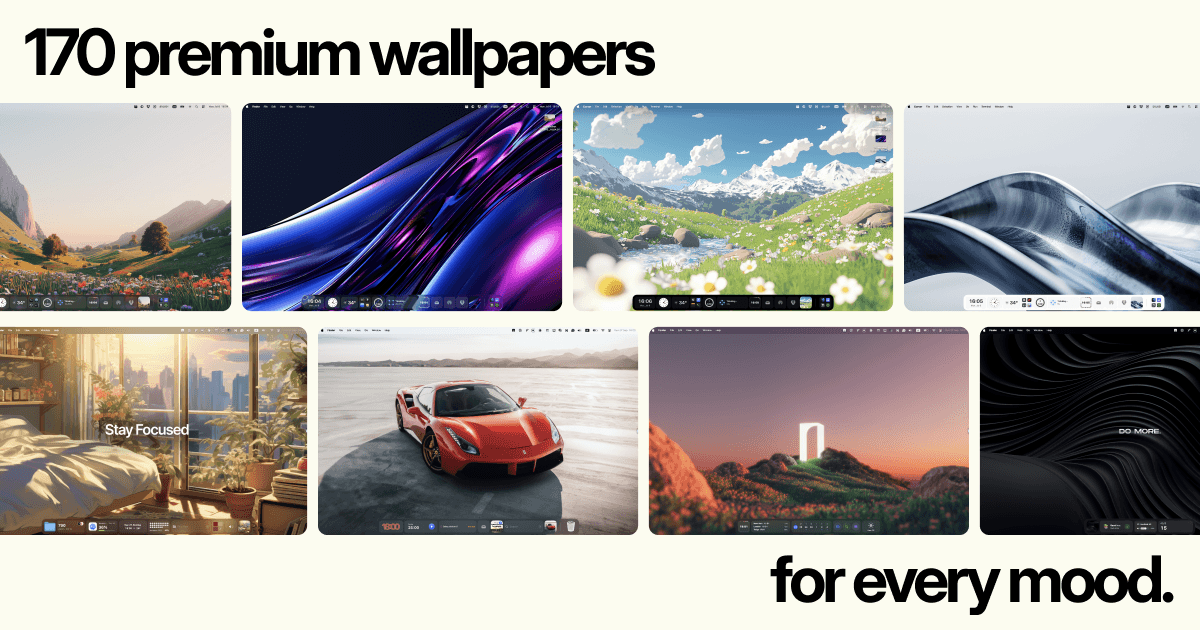
- 160+ live widgets across 20 categories, from clocks and weather to system stats, mail and music.
- Founder and developer widgets: Stripe, Polar, Shopify, GitHub, Linear, Supabase, Plausible and more.
- AI plan-usage gauges for Claude, Codex, Cursor, Copilot, Gemini, Perplexity and others.
- Seven layouts, including floating, reveal-on-hover and full macOS Dock replacement with auto-hide.
- Up to eight Dock profiles, 150+ wallpapers, multi-display support and reserved screen space.
- Native, local-first macOS app. One-time payment, no subscription, 14-day money-back guarantee.

AI video with native sound, paid per clip. Nothing stored.

A calmer Mac menu bar, one click away.

Enterprise Software. Intelligent Automation. Global Impact.


Comments
16Hey everybody, CoolDock is the fifth macOS app in the AppitStudio family, after DockFlow, ExtraDock, ExtraBar and Shiori Bookmarks. CoolDock joined the family through an acquisition this September. It had already won four Design Awards and earned a spot on Awwwards. Since the acquisition we've rebuilt it as CoolDock 2.0. Working through every stability report that came in and adding widgets along the way. Today it has more than 160 live widgets across 20 categories: clocks, weather, calendars, reminders, mail, music, system stats, and a whole set for makers, with revenue from Stripe, Polar and Shopify, GitHub and Linear activity, and plan usage for Claude, Codex, Cursor and Copilot so you never hit a rate limit by surprise. It sits beside your original Dock or replaces it, supports profiles, works across all your displays, and is a one-time purchase with a 14-day money-back guarantee.
I love this app - really helpful!
Freelancer CTO
I really found this helpful. Kudos to the developer.
Good
Cryptocurrency mining has come a long way from the days of home PCs and graphics cards. Today, serious mining runs on ASICs (Application-Specific Integrated Circuits), machines built to do one job and do it exceptionally well. Whether you're a first-time miner or expanding an existing operation, picking the right hardware can mean the difference between steady returns and an expensive paperweight. This guide covers what actually matters when choosing an ASIC miner, so you can buy with confidence. 1. Start With the Algorithm Every ASIC is designed for a specific hashing algorithm, and that choice determines which coins you can mine. SHA-256: Bitcoin (BTC) and a few related coins Scrypt: Litecoin (LTC) and Dogecoin (DOGE) X11, Equihash, and others: Niche networks with smaller but dedicated communities Decide which coin you want to mine first, then look for hardware that supports it. Buying the most powerful machine for the wrong algorithm is a costly mistake. 2. Mining Speed Matters, but Efficiency Matters More Mining speed (measured in TH/s for Bitcoin miners) tells you how fast a machine works. But the number that decides your long-term profitability is efficiency, expressed in joules per terahash (J/TH). A machine with a slightly lower mining speed but much better efficiency will often outperform a "faster" one once electricity costs are factored in. When comparing models, always ask: how much power does it take to produce each unit of mining speed? 3. Know Your Electricity Costs Power is the largest ongoing expense in mining. Before you buy anything, calculate: Your electricity rate per kWh The miner's power draw in watts Your estimated daily and monthly energy cost Run these numbers through a profitability calculator using current network difficulty and coin price. If your power is cheap, you can consider older, less efficient machines at a lower price. If it's expensive, efficiency should be your top priority. 4. Where You Buy Is as Important as What You Buy The market is full of listings, but not every seller is equal. A reliable source should offer authentic hardware, transparent specifications, clear shipping terms, and responsive support. Buying from unverified sellers risks counterfeit units, hidden defects, or machines that never arrive. If you're ready to compare models from a trusted supplier, browsing a curated catalog of any asic miner for sale https://asicminershopforall.com/ is a good way to see current specs, pricing, and availability side by side before committing. Taking the time to compare a few options can save you hundreds, or even thousands, over the lifespan of your equipment. 5. Plan for Cooling, Noise, and Space ASIC miners generate serious heat and noise, often comparable to a loud vacuum cleaner running around the clock. Before your machine arrives, make sure you have: Proper ventilation or a dedicated mining space A stable power supply with the right voltage and amperage Good airflow to extend the life of your hardware A noise plan, since a garage, outbuilding, or insulated room beats a bedroom every time Overheating is one of the leading causes of early hardware failure, so don't treat cooling as an afterthought. 6. Think About Resale Value and Longevity Mining hardware is an investment, and every investment has a lifecycle. Newer, more efficient models hold their value longer, while older machines depreciate quickly as network difficulty climbs. Consider warranty coverage, firmware support, and how easily you could resell the unit if you decide to upgrade or exit. 7. Join a Reputable Mining Pool Solo mining is a lottery. For most miners, joining a pool provides steadier, more predictable payouts. Compare pool fees, payout methods, server locations, and reputation before pointing your computing power anywhere. Final Thoughts Choosing the right ASIC miner isn't about finding the biggest number on a spec sheet. It's about matching the right algorithm, efficiency level, and budget to your real-world conditions, especially your electricity costs. Do your research, run the numbers, buy from a trustworthy source, and prepare your setup in advance. Mining rewards patience and planning. Get the fundamentals right, and your hardware can work for you around the clock for years to come.
I am SEO Specialist working to enhance websites visibility to google.
Congrats on the launch! A second Dock that sits beside the original, so nothing about the current setup changes, is a low-risk way to try it. The profiles are a nice touch too, since switching between a work layout and a personal one with a hotkey sounds really handy. Curious whether widgets can be reordered per profile, and how much memory it uses while running in the background?
I love this app - really helpful! the customizability
sdferafgeargfaergaertgeartgegrg
The combination of profiles, multi-display support, and reserved screen space sounds well thought out for serious workflows. Local-first design plus one-time pricing is a nice contrast to subscription utilities. Which widgets do users rely on most day to day?
Building PZERO, saving you money - pzero.studio
A native local-first macOS second Dock with 160+ widgets, seven layouts, eight profiles, and multi-display support, sold as a one-time purchase, keeps the desktop toolkit off the subscription treadmill. If you ever need spare AI capacity for a side project, PZERO lives at pzero.studio.
Interesting. I think the most attractive feature (at least for me) is the Resend and other widgets to monitor your own startup and the messages you send or any pther data like clicks and sales. Having that in front of you is great for monitoring. I will definitely be giving this a try very very soon. Keep it up.
Hello, I build stuff
A native, local-first second Dock for macOS featuring 160+ widgets, seven layouts, eight profiles, and multi-display support is available as a one-time purchase, keeping this desktop toolkit off the subscription treadmill.
Can individual widgets be disabled to keep CPU and memory usage low? A per-widget resource breakdown would be useful when choosing a setup.
Mac developer. Building Command Reopen.
Leaving the system Dock in place and adding a second strip is the part that makes this usable: seven layouts, up to eight profiles on a hotkey, and 160 widgets without replacing how macOS already works. The founder set (Stripe, GitHub, Linear, plus AI plan-usage gauges) is more specific than a generic widget dock. Asking for a macOS permission only when a widget needs it is the right default. Does the reserved screen space still hold with Stage Manager on a second display, or does it only apply when the dock is pinned on the main screen?
Congrats on the 2.0 rebuild. Keeping the system Dock where it is and adding a second one beside it is a gentle way to try something like this, nothing to undo if it isn't for you. The AI plan-usage gauges caught my eye, since I run into Claude limits mid-session more often than I'd like. How does it read usage for those, through a key you paste in and keep in the Keychain, or something else? And on a MacBook that gets plugged into a monitor every morning, does the dock move to the new display on its own?
The Stripe and Shopify revenue widgets are the ones I'd actually use, but they're also the last thing I'd want showing up in a screen share or a recorded demo. Does CoolDock keep itself out of screen capture, or auto-hide while the screen is being shared or recorded? Even a one-hotkey "presenting" profile with the money widgets turned off would cover it.
The Claude plan-usage gauge is a great idea. I check my usage several times a day. One question: does it handle more than one Claude account? Plenty of people keep a work and a personal account, or one per client, so a gauge per account (or a way to choose which account the widget reads) would make it much more useful for them.