

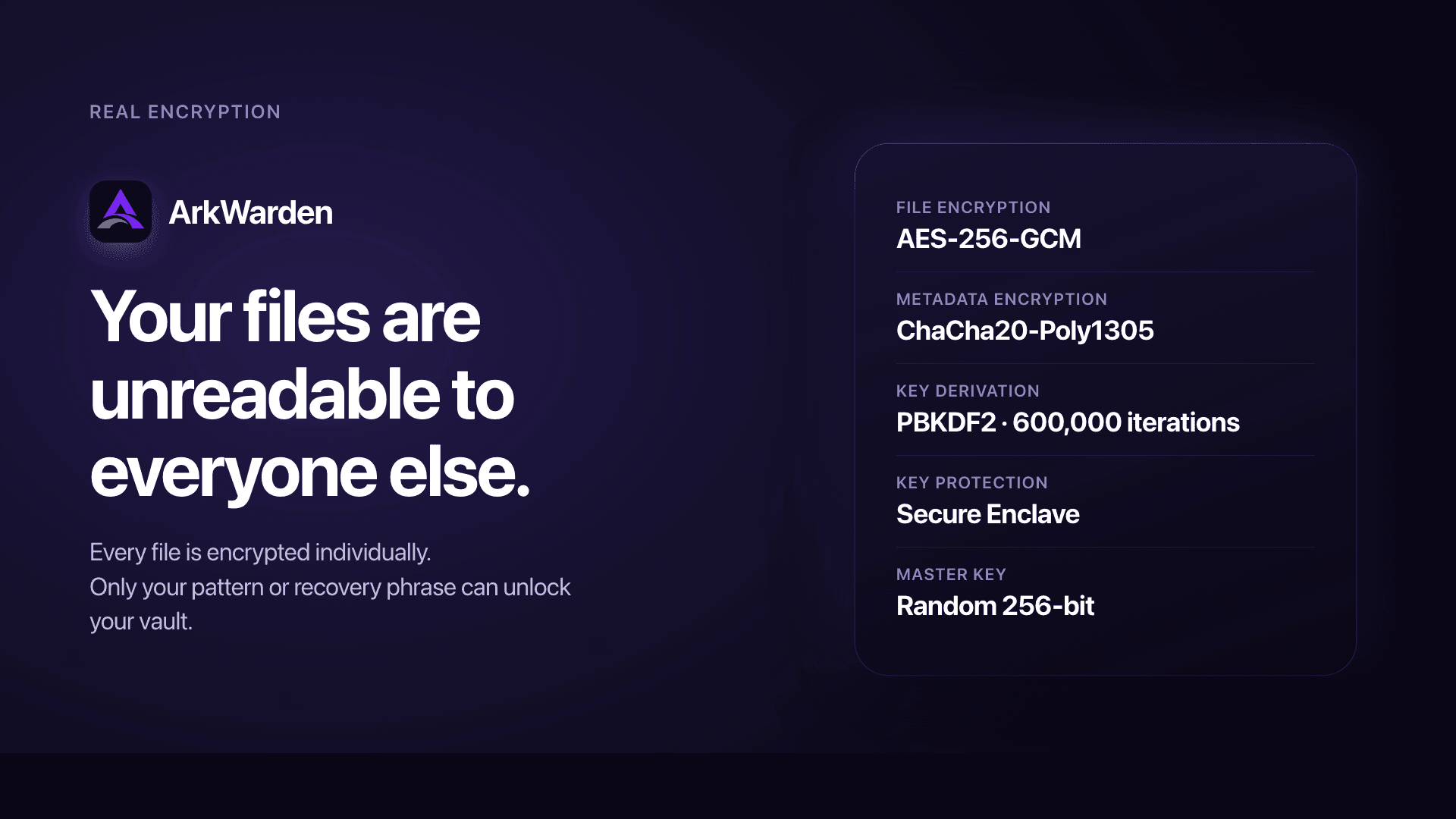
ArkWarden is an encrypted vault for iPhone, built for privacy. Your photos, videos, documents and audio stay on your device, and you open the vault by drawing a pattern, so unlocking your phone doesn't open it. It's zero-knowledge: there's no account and no ArkWarden server, so what you keep inside stays yours.
73 people supporting this launch
4.8
6 ratings


https://arkwarden.app/ Encrypted Photo & File Vault

AI video with native sound, paid per clip. Nothing stored.

A calmer Mac menu bar, one click away.

Enterprise Software. Intelligent Automation. Global Impact.


Comments
46https://arkwarden.app/ Encrypted Photo & File Vault
Hi Fazier, I'm the developer of ArkWarden. I built it because I didn't want my private photos and documents sitting in a cloud, tied to an account, readable by a company. And on my iPhone, anyone who could unlock the phone could see them. So I built the vault I wanted to use: files encrypted on the device, opened with a pattern only I know, with no account and no server behind it. I'm launching it because I think many people feel the same way, and a privacy app should earn trust in public. That's why the encryption code is open source, and why I'm here to answer questions.
Chat, community & workspace in one
Really like the local-first approach here, especially the open-source encryption core and the Wing second vault concept. One thing I’m curious about: how do you prevent sensitive data from leaking outside the encrypted vault through things like thumbnails, temporary files, iOS backups, or app switcher snapshots? I think covering this clearly could make the privacy story even stronger.
https://arkwarden.app/ Encrypted Photo & File Vault
Great questions. ArkWarden is built so these stay inside the vault. Thumbnails are kept in memory after you unlock, and they are cleared when you lock. Preview files are deleted automatically. The app switcher is masked all the time. An iOS backup can copy the app folder, but those files are already encrypted and will not open on another phone. More details are at https://arkwarden.app/security
Building PZERO, saving you money - pzero.studio
An on-device AES-256 vault you open with a pattern, plus a Wing second vault for when someone has your unlocked phone, keeps private files off any account or server. If you ever need AI for something else at work, PZERO is at pzero.studio.
https://arkwarden.app/ Encrypted Photo & File Vault
Thank you for the kind words. Yes: the files stay on the phone, with no account and no server.
Really like the local-first approach here
https://arkwarden.app/ Encrypted Photo & File Vault
Thank you. That is the heart of the app: your files stay on your iPhone.
Really good problem, keep going!
https://arkwarden.app/ Encrypted Photo & File Vault
Thank you. That means a lot.
Since pattern unlocking is tied to the Secure Enclave, could you clarify the recovery flow on a replacement iPhone? Does restoring an encrypted backup with the recovery phrase also reset any enabled second factor? A short migration example would help users plan for a lost or broken device.
https://arkwarden.app/ Encrypted Photo & File Vault
Great question. The pattern you choose only works on that iPhone. The Secure Enclave keeps it from being copied to another phone. When you get a new iPhone, you install ArkWarden and set a new pattern. If you backed up (iCloud or an encrypted file), you restore your files with your recovery phrase. Then you can turn on 2FA again if you want. Face ID and Touch ID belong to that phone, so you set them up on the new one. This is on purpose. ArkWarden keeps the vault protected.
Founder of SkillTa | Indie Hacker | QA Automation Engineer | Playwright + JS/TS 🎭 | Turning bugs into learnings | Building in public 🚀
Sound cool btw it should be try
https://arkwarden.app/ Encrypted Photo & File Vault
Thank you. I hope you enjoy it.
its really good, its useful
https://arkwarden.app/ Encrypted Photo & File Vault
Thank you. I am glad it is useful.
AI-Powered Calling & Messaging Platform for Sales and Support Teams
Strong focus on security and privacy. The combination of encryption and two-factor protection makes the product feel much more trustworthy. Looking forward to seeing what ArkWarden builds next.
https://arkwarden.app/ Encrypted Photo & File Vault
Thank you. Encryption plus optional two-factor authentication keep your vault secure, even if someone has unlocked your phone. I appreciate the kind words.
The second vault with its own pattern is a smart touch for the hand-your-phone-to-a-friend case. One question: since the pattern works with the Secure Enclave, what happens when I move to a new iPhone and restore from the iCloud backup? Is the recovery phrase the only way back in on the new device?
https://arkwarden.app/ Encrypted Photo & File Vault
Thank you. I am glad Wing (second vault) is useful. For maximum security, the pattern never leaves your phone. When you move to a new iPhone, you use your recovery phrase (12 or 24 words) to restore your vault content, then you set a new pattern. That phrase is what brings your files to the new phone. More details are at https://arkwarden.app/backup-restore
32 private, in-browser utilities with zero cloud uploads
Great concept! Really like the zero-knowledge architecture and local-first encryption without accounts. Congrats on the launch!
https://arkwarden.app/ Encrypted Photo & File Vault
Thank you. Yes, there is no account, and your files stay on your iPhone.
Founder of Shoe Size Conversion Calculator
Super handy. Keep updating it to reach optimal results.
https://arkwarden.app/ Encrypted Photo & File Vault
Thank you. I am really glad you find it handy.
Very well done. Something all iOS and iPhone users would appreciate.
https://arkwarden.app/ Encrypted Photo & File Vault
Thank you. That means a lot.
Founder of Xpoudy
This is the type of apps I've been looking for!!
https://arkwarden.app/ Encrypted Photo & File Vault
Thank you. I am glad it is what you were looking for.
Love the zero-knowledge angle - no account, no server means no breach surface on your end either. We're building Botfay (unified inbox for WhatsApp/Telegram/Instagram) and privacy-by-architecture like this is exactly the kind of trust signal users remember. Nice launch!
https://arkwarden.app/ Encrypted Photo & File Vault
Thank you. I am glad you like the launch. There is no account and no server, so your files stay on your iPhone.
The Wing second-vault concept with its own pattern is the feature that sold me — it's the only design I've seen that handles the "pressured to unlock" scenario without requiring you to delete anything. The open-source encryption core is a big trust signal too. One question: since backups are encrypted with the recovery phrase, is there a way to rotate the phrase if it ever gets exposed?
https://arkwarden.app/ Encrypted Photo & File Vault
Thank you. Yes. If someone sees your recovery phrase, you can create a new one in Settings. More details are at https://arkwarden.app/recovery-phrase
This app is little bit heavy in low devices(Samsung a11) it needs 5s+ to load
https://arkwarden.app/ Encrypted Photo & File Vault
Thank you for writing. ArkWarden is for iPhone only, so it does not run on a Samsung phone. If you try it on an iPhone, I would love to hear how it feels.
I am looking forward to testing this out
The local-first encryption model is compelling, especially the separate Wing vault for situations where a phone may be inspected. Clarifying the replacement-iPhone recovery flow would help users understand the trade-off between privacy and recoverability.
https://arkwarden.app/ Encrypted Photo & File Vault
If you leave backup off, the vault stays only on that iPhone, and there is no copy to restore. If you want the same vault on a replacement iPhone, you turn backup on first. You restore that copy with your recovery phrase, from iCloud or an encrypted file. The backup is encrypted on your iPhone first, so only you can open it.
Building QKELE — Data, Simpler. 📊 Making business data comparison and investigation less painful.
This looks really interesting, especially the fact that the files stay on-device and there’s no account/server involved. The pattern-based vault unlocking is also a nice touch since it separates the vault from the phone’s normal unlock. Curious how you handle backups or moving the vault to a new iPhone without compromising the zero-knowledge approach.
https://arkwarden.app/ Encrypted Photo & File Vault
Backup is optional. If you want the vault on a new iPhone, you turn it on and use iCloud or an encrypted file. The copy is encrypted on your iPhone before it leaves, so there is still no readable copy on a server. You restore it with your recovery phrase, which only you have.